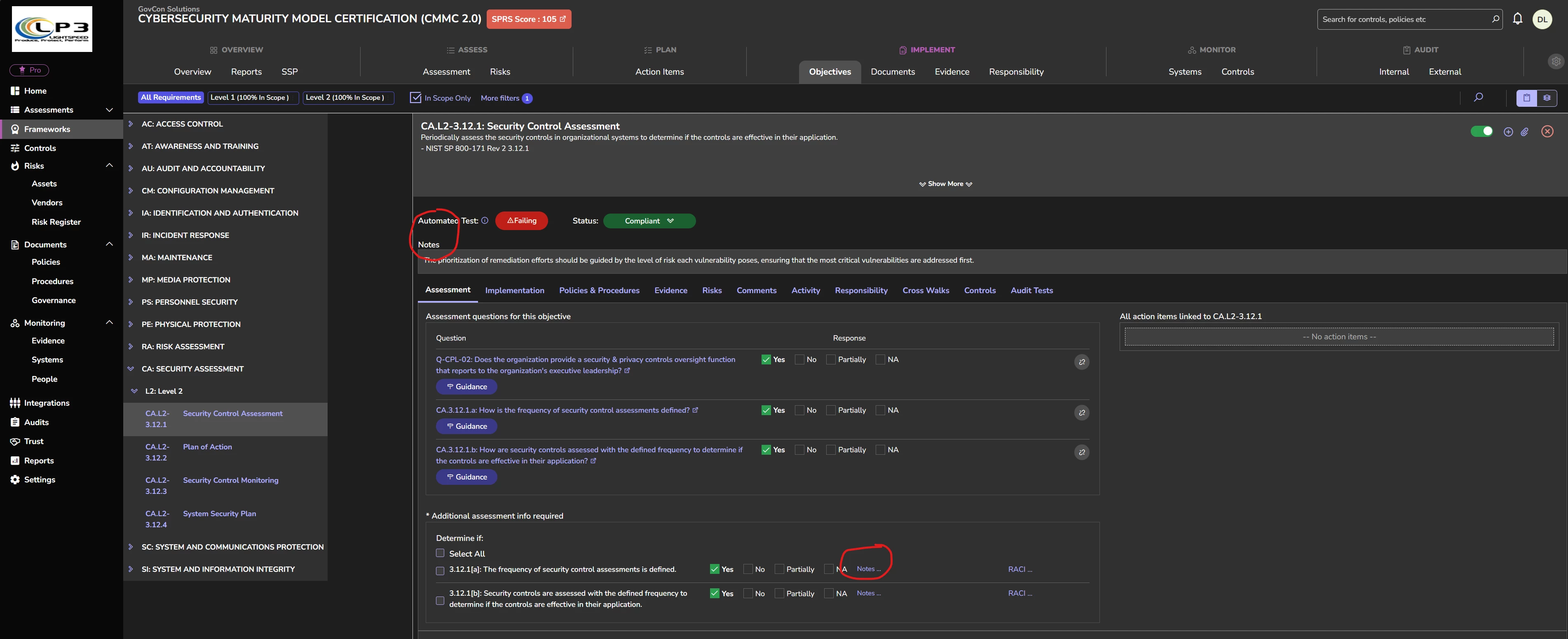

In each control in this case for CMMC 2.0, there is a note section. This is located in two places one is at the bottom and a hyperlink where the customer can enter their response and there is another one at the top which is a summary of the control.
In the note field that follows the hyperlink the save button is way out of place. In fact I would prefer to be able to simply paste my response into that box and then click out of the screen which will automatically save my response thereby saving me a lot of time.
In the note field at the top of the control where the summary goes, the same thing applies with one other problem. When I click in the notes field it causes a format bar to drop down. This requires me to click in the notes box a second time and in many cases I will end up clicking on one of the formatting controls accidentally. When I click in the notes field here it should automatically go to edit and my cursor should be ready to go so I can paste something in using the keyboard. I can then simply click the next control on the left and it will save. Even better would be an arrow to the next response and I could just keep rolling right through all of the sub controls that way.
One last feature would be to get rid of the HTML tags when copying information from control map one section to another. There is an option on right Click to paste only the text but I would recommend that you just only paste the text and no formatting. You don't even need the formatting buttons. No one is going to spend time formatting the control notes. Just make them plain text.
Again these are all time saving features that will add up in large projects.